Repeat response time
Compare the time a client waits for an eligible repeated query with the direct platform response.
 houdata.
CacheOLAP Private preview
CacheOLAP sits on selected analytical query paths and reuses eligible results under an explicit freshness policy. Evaluate faster repeat responses and less work sent to your data platform against the workload you actually run.
Explore CacheOLAP
The private preview has its own use cases and technical overview, including the conditions that determine whether a result can be reused.
The analytical workload
Dashboards, reports and applications may ask a platform to execute the same query repeatedly. Where the result can be reused, CacheOLAP can answer a repeat request from a shared cache while a miss still reaches the platform.
The value is specific to the query, result size, repeat rate and permitted freshness window. The preview begins by measuring those conditions, rather than assuming that every analytical query is a cache candidate.
What to evaluate
Cache outcomes become useful when they are compared with direct access on the same client path and a representative workload.
Compare the time a client waits for an eligible repeated query with the direct platform response.
Count the eligible requests served from cache and examine the backend work those requests would have repeated. Cost impact depends on the platform's billing model.
Set a result lifetime that fits the data update cycle and verify that cache sharing respects the identities and permissions in scope.
The Houdata console reports work saved per platform, in the units the platform reports, and per query. See the console.
Private preview integrations
These integrations are experimental. Compatibility is qualified for the exact client, platform configuration and query pattern in each evaluation.
Google's HTTPS query and jobs APIs
Repeated eligible query results, including paged results read through the proxy.
SQL statement API and Thrift over HTTP
Repeated eligible warehouse reads through supported client paths.
Spark Thrift Server, binary or HTTP
Repeated eligible reads after the client has consumed the complete result.
Driver REST traffic and SQL API v2
Repeated eligible reads whose result passes through the proxy in full.
A listed platform does not mean all of its APIs, drivers or result formats are covered. Large results delivered directly from cloud storage may bypass the proxy and cannot be cached on that path.
Architecture
Qualified clients connect through CacheOLAP to the analytical platform. Eligible repeated results can be served from a shared cache.
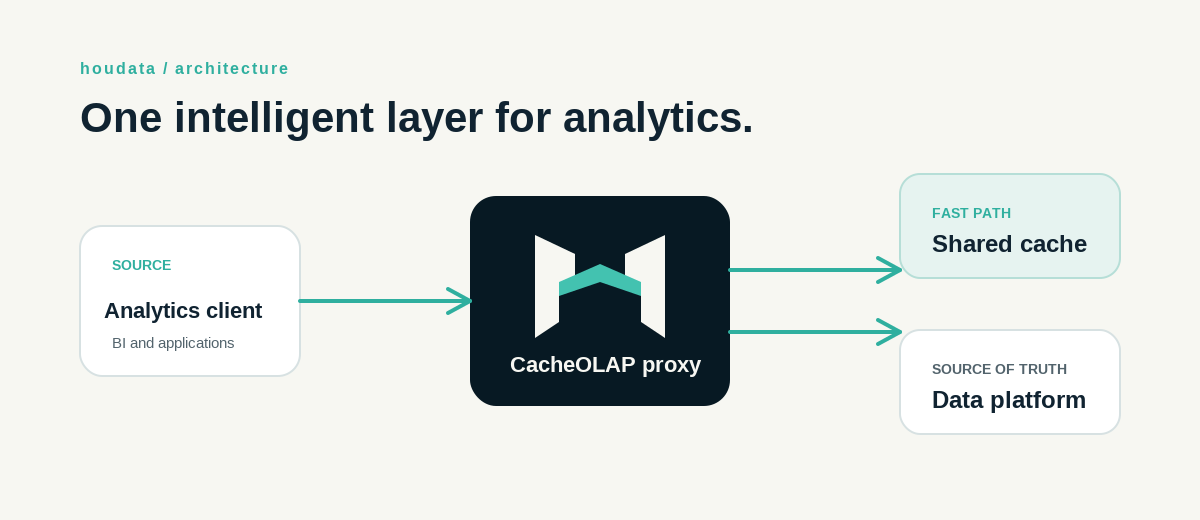
What changes in your client
The client keeps its SDK and its SQL and points to CacheOLAP as its API endpoint. A result is reused only when a script you have reviewed grants it a lifetime; without that, every request goes to the platform.
https://bigquery.googleapis.comclient_options.api_endpoint = "https://cacheolap.internal:54331"[database]
backend = "bigquery"
addr = "bigquery.googleapis.com:443"
[proxy]
frontend_protocol = "bigquery"
listen_addr = "0.0.0.0:54331"
[bigquery]
# Each identity only receives results it left in the cache itself.
cache_sharing = "per_principal"
[scripting]
script_path = "hooks/bigquery/cache.rhai"
[redis]
cache_mode = "full"
url = "redis://127.0.0.1:6379"fn on_dql_parsed(ctx, metadata) {
// A table that changes all the time is not worth caching:
if metadata.tables.contains("events_stream") {
proxy::bypass_cache();
return;
}
// A dimension that changes once a day can be kept for hours:
if metadata.tables.contains("dim_country") {
proxy::set_cache_ttl(6 * 3600);
return;
}
// Everything else is kept for an hour.
proxy::set_cache_ttl(3600);
}
fn on_dml_completed(ctx, result, metadata) {
if !result.success || metadata.tables_written.len() == 0 {
return;
}
// Ends every cached read of the tables this statement wrote.
cache::invalidate_tables(metadata.tables_written);
}The sample leaves a fast-changing table out of the cache, keeps a daily dimension for hours, keeps every other eligible read for an hour and ends those results when a table is written through the proxy. Writes made another way, such as load jobs or table APIs, need their own freshness strategy. Each integration ships its own sample and configuration; the console is where you inspect the effect.
Designed around real data
Analytical data can change through scheduled loads, streaming jobs, tasks and clients that never pass through CacheOLAP. Those changes cannot automatically invalidate a result the proxy has stored. An agreed TTL, explicit clearing where needed, and tests against the data update cycle define the useful boundary.
Identity and session state can also change what a query returns. The preview checks the account, role or user context and only enables result reuse where the integration can account for it. Calls that cannot be inspected or results that do not pass through the proxy continue to the platform without a cache hit.
Private preview
Access is arranged with Houdata for a defined technical evaluation. The goal is evidence about suitability, limitations and operational fit.
Identify the platform, client or driver, query pattern and result shape.
Agree identities, freshness needs, external data changes and deployment constraints.
Run direct and proxied requests, then enable reuse for eligible queries.
Compare latency, cache outcomes and platform work before deciding whether to expand.
Request access
Tell us which platform and client you use, which queries repeat, how current the answer must be, and what you want to measure. We will scope a private evaluation together.